Register Alerts via Telegram
You can register to receive massive traffic alerts from IntelliFend through Telegram when your application's incoming requests significantly exceed normal levels.
To register, please follow the steps outlined below:
Step 1/ Provide your Telegram ID.
You need to provide your Telegram ID during account registration or later through the "My Profile" section.
To retrieve your Telegram ID:
- Open the Telegram application
- Search for ‘@GetMyChatID_Bot’
- Enter ‘/start’ to receive your Telegram ID
To update your Telegram ID at any time, follow these steps:
- Navigate to IntelliFend Back Office
- Click on the profile icon at the bottom left > Select My Profile
- Click the pencil icon next to the Telegram ID field and update your Telegram ID.
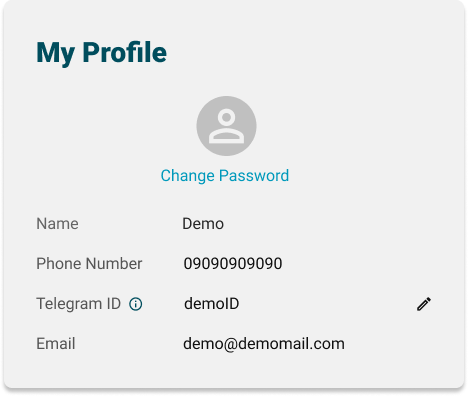
If you wish to receive alerts using a new Telegram ID, please update your information in the IntelliFend Back Office, and activate the IntelliFend bot again (as in Step 2).
Step 2/ Activate the IntelliFend bot in Telegram
To activate the IntelliFend bot and start receiving alerts, follow these steps:
- Click this link: https://t.me/IntellifendAlerter_Bot
- Enter
/start - Register your application to receive alert:
/register <application name>
Note: The Telegram ID you use to chat with the IntelliFend bot must be the same as the Telegram ID you provided in Step 1.
Once these steps are completed, you will receive alerts from IntelliFend via Telegram whenever your application experiences an unusual spike in traffic.